This section link is no longer available. Start from the first section.
Designing an Email Service at Scale
Design a distributed email platform handling 1 billion users, 50 billion messages a day, and petabytes of persistent mailbox storage.
1. The Problem and Scope
When you build a standard web API, you control the rules: clients must authenticate, send the JSON format you expect, and use endpoints you defined.
Email doesn’t work that way. Any mail server in the world (whether it’s Google, Yahoo, or an unknown server) can connect directly to your system without an account or an API key and drop off a message. You cannot change the communication standard (SMTP), force senders to use custom SDKs, or block unknown connections without breaking email delivery for your users. As an email provider, your system must sit open to the global internet, accept traffic from strangers, and reliably separate legitimate mail from spam.
System Scope (1 Billion Users)
- Send & Receive: REST/HTTPS APIs for web and mobile apps; standard SMTP for exchanging emails with external providers (like Gmail, Outlook, and Yahoo).
- Mailbox Management: Folder listings (Inbox, Sent, Trash), read/unread status filtering, and conversation threading (grouping replies into a single thread like Gmail).
- Full-Text Search: Sub-second search across subject, body, sender, and date ranges over decades of history.
- Attachments: Upload, store, and download files up to 25 MB per message.
- Security & Spam Protection: Sender verification and anti-spoofing (SPF, DKIM, DMARC), malware scanning, spam scoring, and safe bounce handling (avoiding backscatter spam).
- Multi-Device State Sync: Propagate mailbox mutations (marking as read, moving folders) across all active sessions within 1 second.
2. Scale and Requirements
Non-Functional Requirements & Service Level Objectives
| Metric / Dimension | Target | Rationale |
|---|---|---|
| Active Users | 1 Billion | Target platform capacity |
| Availability | 99.99% (~52 min downtime/yr) | Core communication infrastructure |
| Durability | Zero data loss on accepted mail | Once an SMTP 250 OK is returned, the message must never be lost |
| Consistency | Read-your-writes per mailbox | A user must immediately see an email they just marked as read or sent |
| Listing Latency | < 200 ms p95, < 500 ms p99 | Smooth user experience when scrolling folder views |
| Search Latency | < 1,000 ms p99 | Full-text search over years of personal history |
| Data Retention | Indefinite | Mail is kept until the user explicitly deletes it |
Estimation and Sizing (The Reality Check)
Calculations for 1 billion users establish the operational boundaries and dictate storage tiering:
Ingress & Traffic Scale
| Metric / Dimension | Baseline Calculation | Peak Scale (2.5–3×) | Engineering Implication |
|---|---|---|---|
| Outbound Sends | 1B users × 10 sends/day = 10B/day (115K/s) | ~300,000/s | Outbound MTA spool queues & TLS handshakes |
| Inbound Receives | 1B users × 40 recvs/day = 40B/day (463K/s) | ~1,200,000/s | Edge ingestion ceiling across MX gateways |
| Concurrent TCP | 1.2M peak QPS × 1.5s transaction duration | 1.8M sockets | ~60 Anycast edge nodes (~30K sockets/node, within epoll limits) |
| Network Inbound | 463K × 150 KB avg = 70 GB/s (~560 Gbps) | 180 GB/s (~1.44 Tbps) | Base64 MIME wire expansion adds ~33% overhead to 7-bit ASCII SMTP |
Storage Footprint & Ingestion Matrix
| Data Tier | Payload Assumption | Daily Ingest | Annual Footprint | Storage Engine & Access Model |
|---|---|---|---|---|
| Bodies | 50 KB avg text body | 2 PB/day | ~730 PB/year | Cloud Object Storage (S3) — immutable, lifecycle cold tiering |
| Attachments | 20% msgs × 500 KB (100 KB amortized) | 4 PB/day | ~1,460 PB/year | Cloud Object Storage (S3) — chunk-deduplicated, presigned URLs |
| Metadata | ~2.5 KB headers, flags, recipient state | 100 TB/day | ~36.5 PB/year | Cassandra (Replicated) — fast partition reads by user_id |
| Search Index | ~2 KB extracted token text / message | 80 TB/day | ~30 PB/year | Elasticsearch (Replicated) — distributed full-text inverted index |
| Total Inbound | 150 KB avg / message (50 KB body + 100 KB att.) | ~6 PB/day | ~2.2 PB raw/yr | Claim-Check Pattern: metadata in DB, bodies/attachments in S3 |
3. Core Mental Models
Before drawing boxes and arrows, four foundational mental models govern how modern email systems work.
Mental Model 1: The Envelope vs. The Message (Routing vs. Display)
Every email has two separate parts: the envelope (used by servers to deliver it) and the message (what the human reads).
Think of physical postal mail:
- The postal worker only reads the outside of the envelope to deliver the letter and know where to return it if it bounces. They never open it.
- The recipient only reads the letter inside.
In an email system:
- The Envelope (Routing Data): The hidden server-to-server instructions that tell mail servers where to deliver the message and where to send bounce errors.
- The Message (Display Data): The visible headers (
From:,To:,Subject:) and body text rendered inside email apps like Gmail or Apple Mail.
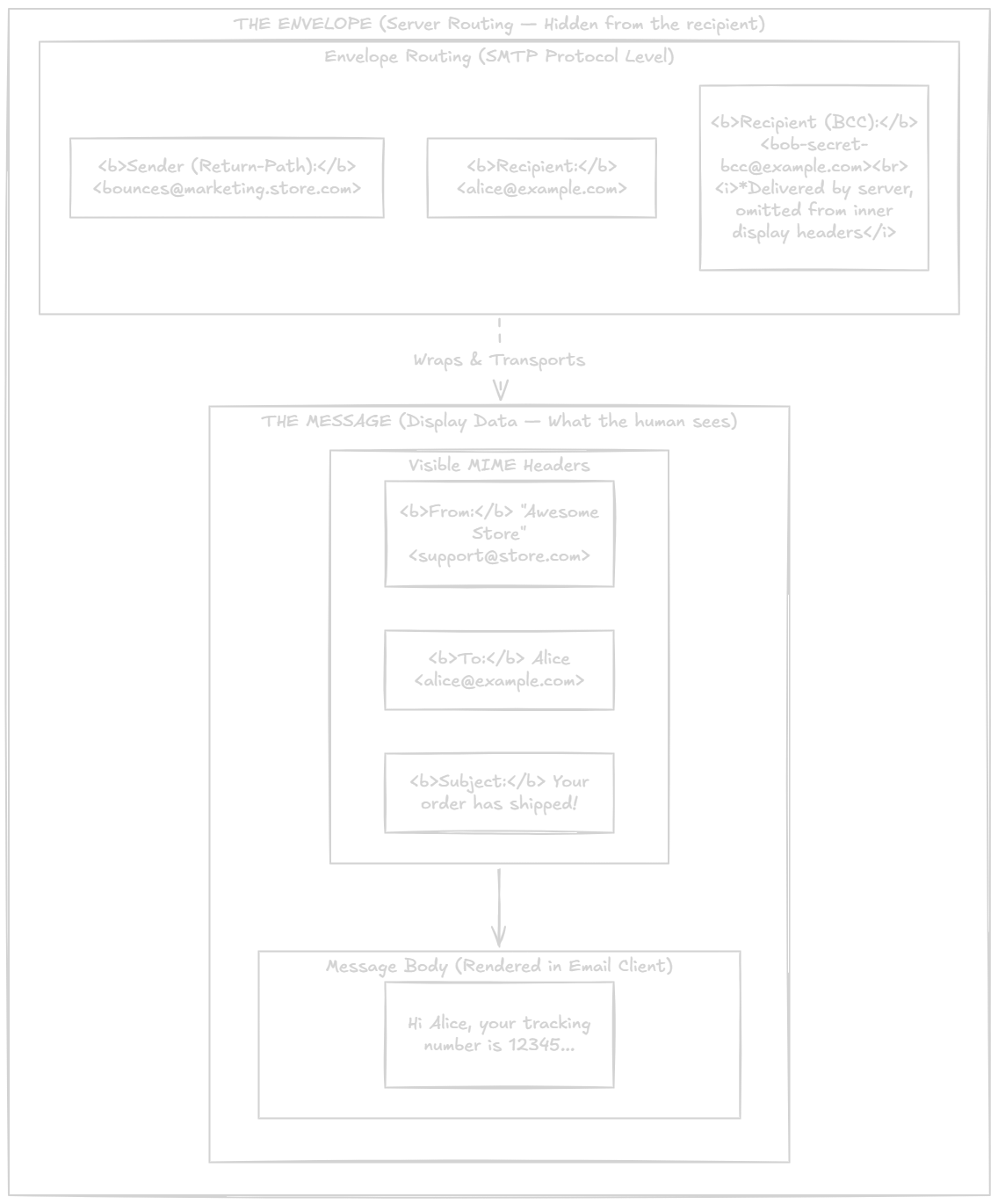
Why this distinction matters:
- How BCC works: A BCC recipient’s address is added to the envelope (so servers deliver it), but omitted from the message headers (so other recipients never see it).
- Why spoofing happens: Because the message is just text inside an envelope, a spammer can write
From: security@yourbank.cominside the message even if the envelope originated elsewhere. This is why domain security checks (SPF, DKIM, DMARC) verify both the envelope sender and the message contents.
Mental Model 2: The Mailbox is an Isolated Partition
Unlike Twitter or LinkedIn, where one user’s post fans out into millions of followers’ feeds, an email mailbox is completely self-contained:
- A user only queries their own folders.
- A user only searches their own messages.
- A user’s read/unread updates only affect their own mailbox.
There are zero cross-user joins in email. This makes email the textbook candidate for horizontal partitioning: every database table can be cleanly sharded by user_id.
Mental Model 3: Legacy Protocols Outside, Modern Stack Inside
To talk to the outside world, your system is forced to speak 40-year-old SMTP on port 25. But inside your own infrastructure, you never use it.
Think of your inbound mail servers as a translation layer at the front door:
- At the edge: Your servers speak strict, standard SMTP so external mail providers (like Google or Yahoo) can deliver messages to you without compatibility issues.
- Behind the edge: The moment bytes arrive, your edge servers convert them into internal events, queue them in Kafka, and process them using a modern distributed stack (Cassandra for metadata, S3 for storage).

You obey open internet standards at the front door so the world can reach you, but run a standard, cloud-native backend behind the scenes.
Mental Model 4: How Incoming Emails Find Your Server (DNS MX & Anycast)
When an outside server (like Gmail) needs to deliver an email to user@yourcompany.com, how does it know where to connect? It relies on two core networking mechanisms:
-
DNS MX Records (Finding the Server):
Web browsers look up a domain’sArecord to find its web server. Email works differently: the sender asks DNS for the domain’s MX (Mail Exchange) records.
These records return your mail server addresses along with a priority number (for example,priority 10: mail-primary.yourcompany.comandpriority 20: mail-backup.yourcompany.com). Senders always try the lowest number first. If your primary datacenter is down or unresponsive, the sending server automatically falls back to your backup server. -
Anycast Routing (Reaching the Nearest Datacenter):
At global scale, an email sent from Tokyo shouldn’t have to travel all the way to a server in Virginia just to complete a TCP handshake.
With Anycast, your edge gateways across multiple regions (North America, Europe, Asia) advertise the exact same public IP address. Internet routers automatically direct incoming connections to whichever regional datacenter is network-closest to the sender, minimizing latency and spreading global traffic. (How it works: BGP routers choose the path with the fewest hops—when Tokyo and Virginia announce the same IP, a sender in Japan is routed to Tokyo in 4 ms rather than crossing the ocean to Virginia in 160 ms).
4. High-Level Architecture
An email service is best understood as two independent one-way pipelines that share storage:
- The Outbound Pipeline: When your user clicks “Send” to email the outside world.
- The Inbound Pipeline: When an external server delivers mail into your user’s inbox.
Separating them into two distinct flows makes the entire architecture straightforward to follow.
Pipeline 1: Sending an Email (Outbound)
When a user clicks “Send”, the message is saved, queued, and delivered to the recipient’s mail provider in the background:

- Submit: The user’s app sends the email via
POST /v1/messages. The API server saves the body in S3, records an outbox task in Cassandra, and returns202 Acceptedimmediately so the user isn’t kept waiting. - Queue & Deliver: An outbox worker pushes the task into Kafka. Outbound workers sign the message with DKIM (attaching a cryptographic signature using the sender domain’s private key to prove the email isn’t forged), look up the recipient’s DNS MX record, and deliver it to the external mail provider over SMTP.
Pipeline 2: Receiving an Email (Inbound)
When an outside server sends mail to one of your users, it lands at your gateway, gets scanned for spam, and is delivered to their inbox:

- Ingest & Acknowledge: The foreign server connects to your Inbound Gateway on port 25. The gateway streams the raw body to S3 and writes a lightweight claim-check pointer to Kafka before acknowledging
250 OK. - Scan & Index: Background workers pull from Kafka, check for viruses and spam, save metadata to Cassandra, and index the text in Elasticsearch.
- Notify (Online vs. Offline):
- If user is Online (Active tab / app): The Push Service dispatches a lightweight WebSocket frame so the new email pops up on screen instantly with zero manual refresh.
- If user is Offline (App closed / phone asleep): The system dispatches an OS push notification via Apple APNs or Google FCM. The email is already permanently saved in Cassandra and S3; whenever the user opens their app next, the client pulls missing messages via delta sync (
GET /v1/sync?since=...).
5. Component Responsibilities & Contracts
| Component | Primary Responsibility | Input | Output / Calls | Failure Strategy |
|---|---|---|---|---|
| API Web Server | Validates requests, verifies idempotency lease, uploads S3 payload, writes atomic outbox | Client HTTPS REST call | Writes to S3 & Cassandra; returns HTTP 202 | Returns 202 on retry with same idempotency key |
| Outbox Relay | Tails outbound_outbox, publishes to Kafka, writes Sent folder row | Pending outbox rows | Produces to Kafka Outgoing Queue | Idempotent retries; at-least-once dispatch |
| Outgoing Queue (Kafka) | Buffers outbound delivery tasks partitioned by destination domain | Outbox tasks | Consumed by Outbound Workers | Multi-AZ replication (min.insync.replicas=2) |
| SMTP Outbound Worker | Signs DKIM, resolves DNS MX, manages SMTP connection pools and TLS delivery | Dequeued task | Remote MTA SMTP connection | 4xx triggers exponential retry topic; 5xx triggers Non-Delivery Report (NDR) |
| SMTP Inbound Server | Terminates port 25, runs SPF/DMARC edge check, mints email_id, streams to S3 | External SMTP socket | S3 stream + Kafka Incoming Queue | Acknowledges 250 OK only after Kafka commits |
| Incoming Queue (Kafka) | Buffers inbound claim-checks partitioned by hash(user_id) | Claim-check pointers | Consumed by Mail Processing Workers | Multi-AZ replication (min.insync.replicas=2) |
| Mail Processing Worker | Antivirus, ML spam scoring, writes Cassandra metadata, updates search index | Claim-check pointer | Writes to Cassandra, Elasticsearch, Redis, RTS | Idempotent upserts keyed on (user_id, email_id) |
| Metadata DB (Cassandra) | User-partitioned storage for folders, messages, unread indices, change logs | CQL read/write operations | High-throughput reads/writes | LOCAL_QUORUM survives 1 AZ loss without downtime |
| Object Store (S3) | Immutable storage for email bodies and file attachments | Raw byte streams | Content keys / Presigned download URLs | Multi-AZ cloud object storage with cross-region durability |
| Search Index (Elasticsearch) | Full-text query engine | Document mutations via Kafka | Query hit lists | Sharded by user_id; rebuilt from Cassandra if lost |
| Real-Time Server | Maintains persistent WebSocket connections to active user devices | Internal change notifications | WebSocket push frames | Stateless connection registry stored in Redis |
6. Communication Protocols & APIs
Protocol Selection
| Protocol | Usage & Scope | Purpose |
|---|---|---|
| HTTPS (REST) | Interactive web & modern mobile clients | Primary interface for rich user actions (compose, view folders, search, draft autosave). |
| SMTP / POP / IMAP | Native desktop & legacy mobile clients | Backward-compatibility for third-party clients (Apple Mail, Outlook, Thunderbird) to send and sync mail. |
| SMTP (Port 25) | Sender & receiver mail server communication | Global server-to-server routing and message exchange across the internet. |
Client Retrieval: POP vs. IMAP vs. HTTPS
| Protocol | Architecture Model | Multi-Device? | Attachments | Mobile Network & Battery |
|---|---|---|---|---|
| POP3 (RFC 1939) | Download & Delete: Local disk only | No (Single PC only) | Full download required upfront | Ephemeral TCP; re-downloads waste bandwidth |
| IMAP (RFC 3501) | Server Mirror: Centralized sync | Yes (Native multi-device) | Headers first; bodies on-demand | Poor: persistent IDLE sockets drain mobile battery |
| HTTPS + Push | Stateless REST + Push (APNs/FCM) | Yes (Sub-second live sync) | On-demand via S3 presigned URLs | Best: Radios sleep until push; resumes seamlessly |
Why Apps Bypass IMAP: Persistent IMAP
IDLEsockets prevent phone radios from entering low-power sleep and drop frequently across Wi-Fi/5G transitions. First-party apps use stateless HTTPS REST with push notifications for zero idle battery drain, instant reconnection via delta sync (GET /v1/sync?since=...), and native OAuth2/biometric auth.
Core API Endpoints
| API | Purpose | Request & Response |
|---|---|---|
POST /v1/messages | Send a new email or submit an outbound task. | Accepts recipients (to, cc, bcc), subject, body/attachments, and an Idempotency-Key header. Returns 202 Accepted with a message_id once safely persisted to S3 and Cassandra outbox. |
GET /v1/folders | List all mail folders for the account. | Retrieves user folders (Inbox, Sent, Archive, Junk, Trash) along with folder IDs, total message counts, and unread counts. |
GET /v1/folders/{folder_id}/messages | Retrieve messages within a folder. | Accepts folder_id, limit (e.g., 50), and pagination cursor. Returns message summaries (sender, subject, snippet preview, is_read, timestamp) ordered by email_id DESC. |
GET /v1/messages/{message_id} | Fetch full message metadata and content. | Accepts message_id. Returns message metadata (from, to, subject, is_read), parsed body text/HTML, and presigned S3 download URLs for attachments. |
- Authentication & Security: HTTPS endpoints enforce OAuth 2.0 / JWT bearer authentication and rate limiting per user. SMTP connections require TLS (STARTTLS) and authenticate through SASL on port 587 for client submissions.
- Idempotency Guarantee: Outbound sends require an
Idempotency-Keyheader. Network timeouts retried by the client return the existing202 Acceptedresponse without sending duplicate emails. - Pagination Strategy: Folder listings use keyset/cursor-based pagination tied to Cassandra
bucket_monthandTIMEUUIDclustering keys rather than slow SQL-styleOFFSETscans.
7. How the System Works: Deep Step-by-Step
To design an email system at scale, you have to follow two completely different operational lifecycles:
- The Outbound Lifecycle: What happens from the moment Alice taps “Send” on her phone until Bob’s mail server in London accepts the message.
- The Inbound Lifecycle: What happens when an untrusted server knocks on your port 25, through spam and anti-spoofing defense, until the email appears on Alice’s screen.
7.1 The Outbound Lifecycle: Sending an Email
When a user sends an email, the architecture must guarantee three things: zero data loss, idempotent delivery (never send duplicate emails if a user double-clicks), and no dual-write inconsistencies between the database and the message queue.
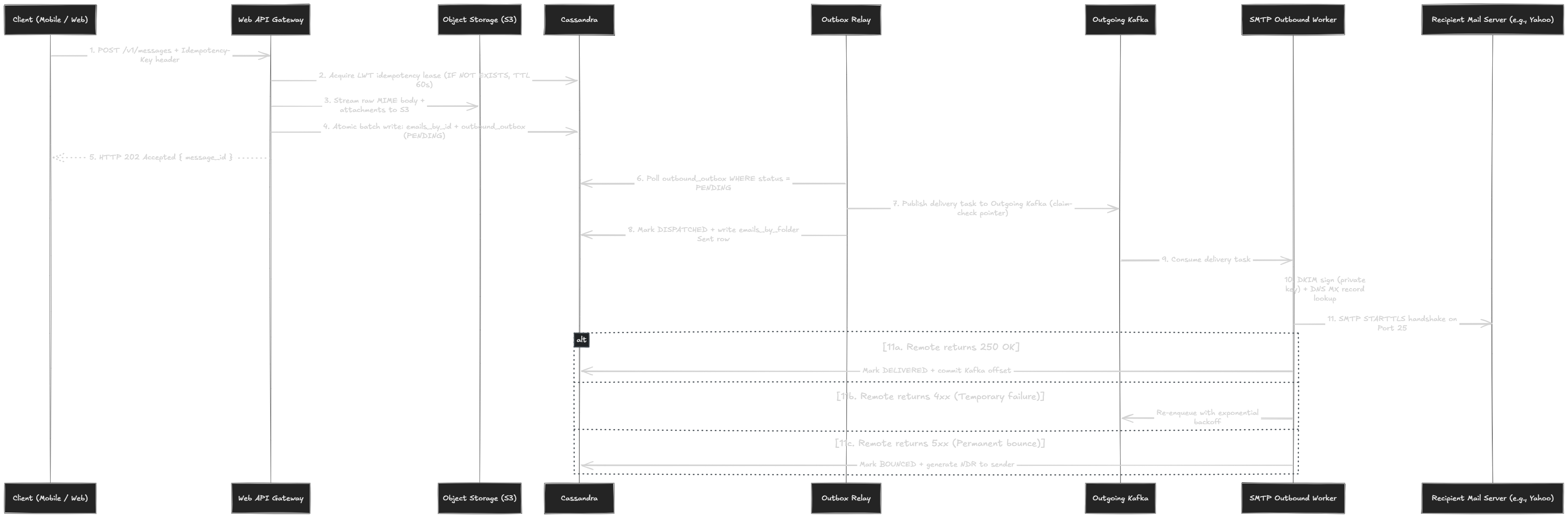
Phase 1: Ingestion & Transactional Outbox (Steps 1–5)
- 1. Stateless Client Ingestion (
POST /v1/messages):
Alice’s app submits headers, body, recipients, and anIdempotency-Key: <UUID>header. Mobile devices use HTTPS rather than SMTP to avoid connection drops during cellular handoffs. - 2. Atomic Idempotency Lease (Cassandra LWT):
Before touching S3 or Kafka, the gateway claims an exclusive 60-second lease via Paxos:INSERT INTO idempotency_keys (user_id, idempotency_key, message_id, status) VALUES (?, ?, ?, 'IN_PROGRESS') IF NOT EXISTS USING TTL 60;- If a network retry occurs while
IN_PROGRESS, the gateway returns409 Conflict. - Once Step 4 commits, the status flips to
'COMPLETED'. Later retries instantly receive the cached202 Acceptedresponse with the existingmessage_id.
- If a network retry occurs while
- 3. Payload Offload — The Claim-Check Pattern (S3):
The gateway streams raw MIME bodies and attachments directly to S3 (s3://email-bodies/{year}/{month}/{email_id}.body).- Why not Kafka or Cassandra? 25 MB email payloads trigger JVM GC freezes in Kafka and WAL/compaction storms in Cassandra. S3 holds the bulk; only a
< 1 KBJSON pointer travels downstream. - SHA-256 Deduplication: If an attachment is sent to 100 internal users, it is stored in S3 once, saving 99% redundant storage.
- Why not Kafka or Cassandra? 25 MB email payloads trigger JVM GC freezes in Kafka and WAL/compaction storms in Cassandra. S3 holds the bulk; only a
- 4. Single-Partition Atomic Outbox Batch (Cassandra):
To prevent the “dual-write trap” (where DB succeeds but Kafka fails), metadata and delivery tasks commit together:
Because both tables share the partition keyBEGIN BATCH INSERT INTO emails_by_id (user_id, email_id, subject, body_storage_key, ...) VALUES (...); INSERT INTO outbound_outbox (user_id, email_id, payload, status) VALUES (?, ?, ?, 'PENDING'); APPLY BATCH;((user_id, email_id)), the batch executes on a single Cassandra node in ~2 ms with full ACID atomicity. - 5. Fast Client Acknowledgment (
202 Accepted):
The gateway returns202 Acceptedwith themessage_id. Alice never waits for remote SMTP delivery.
Phase 2: Decoupled Queueing & Change Data Capture (Steps 6–8)
- 6. CommitLog CDC Tailing (Zero-Poll Outbox):
PollingWHERE status = 'PENDING'across Cassandra partitions is an illegal cluster-wide scan. Instead,outbound_outboxuses Cassandra Change Data Capture (cdc = true). The Outbox Relay tails CommitLog segments directly from disk, streaming mutations to Kafka with zero query load. - 7. Domain-Partitioned Kafka Queueing:
Tasks are published to Kafka withacks=all(min.insync.replicas=2), partitioned by destination domain (e.g.,hash(yahoo.com)). This concentrates all Yahoo-bound tasks on dedicated worker threads to maximize TCP and TLS session reuse. - 8. Sent Folder Materialization:
Once Kafka acknowledges, the relay writes theemails_by_folderrow for Alice’s Sent folder (((user_id, folder_id, bucket_month))). Keeping this out of Step 4 avoids an expensive cross-partition distributed batch.
Phase 3: Cryptographic Pre-Flight & SMTP Wire Delivery (Steps 9–11)
- 9. Pre-Flight Signing & Resolving:
- DKIM Signing (RFC 6376): Hashes canonicalized headers (
From,To,Subject,Date,Message-ID) and body, signs with the domain’s private RSA/Ed25519 key, and injects theDKIM-Signatureheader. - DNS MX Resolution: Queries DNS for recipient MX hosts ordered by preference (lowest number first).
- BCC Header Stripping: Creates isolated MIME streams per BCC recipient, ensuring no recipient sees BCC metadata.
- DKIM Signing (RFC 6376): Hashes canonicalized headers (
- 10. On-the-Wire SMTP Delivery Session (Port 25):
The worker connects to the remote MTA over STARTTLS:Our Server: EHLO mail.ourdomain.com Remote MTA: 250-STARTTLS Our Server: STARTTLS (Upgrades socket to TLS) Our Server: MAIL FROM:<alice@ourdomain.com> (Envelope sender) Remote MTA: 250 OK Our Server: RCPT TO:<bob@yahoo.com> (Envelope recipient) Remote MTA: 250 OK Our Server: DATA Remote MTA: 354 Start mail input; end with <CRLF>.<CRLF> Our Server: [Streams canonical MIME headers + DKIM-Signature + Body] Our Server: . Remote MTA: 250 OK: Message accepted for delivery - 11. Response Code Playbook:
250 OK: Custody transferred. MarkDELIVEREDinoutbound_delivery_stateand commit Kafka offset.4xx(Transient): Greylisting/rate-limit. Enqueue to exponential retry topic (5m → 15m → 1h → 4h → 12h; bounce after 4 days).5xx(Permanent): Invalid mailbox / blocked domain. MarkBOUNCEDand generate an authenticated Non-Delivery Report (NDR) to Alice.
7.2 The Inbound Lifecycle: Receiving an Email
When an untrusted server knocks on port 25, the gateway must: reject spam before disk writes, guarantee multi-AZ durability before confirming acceptance, and push new mail to active devices in real time.
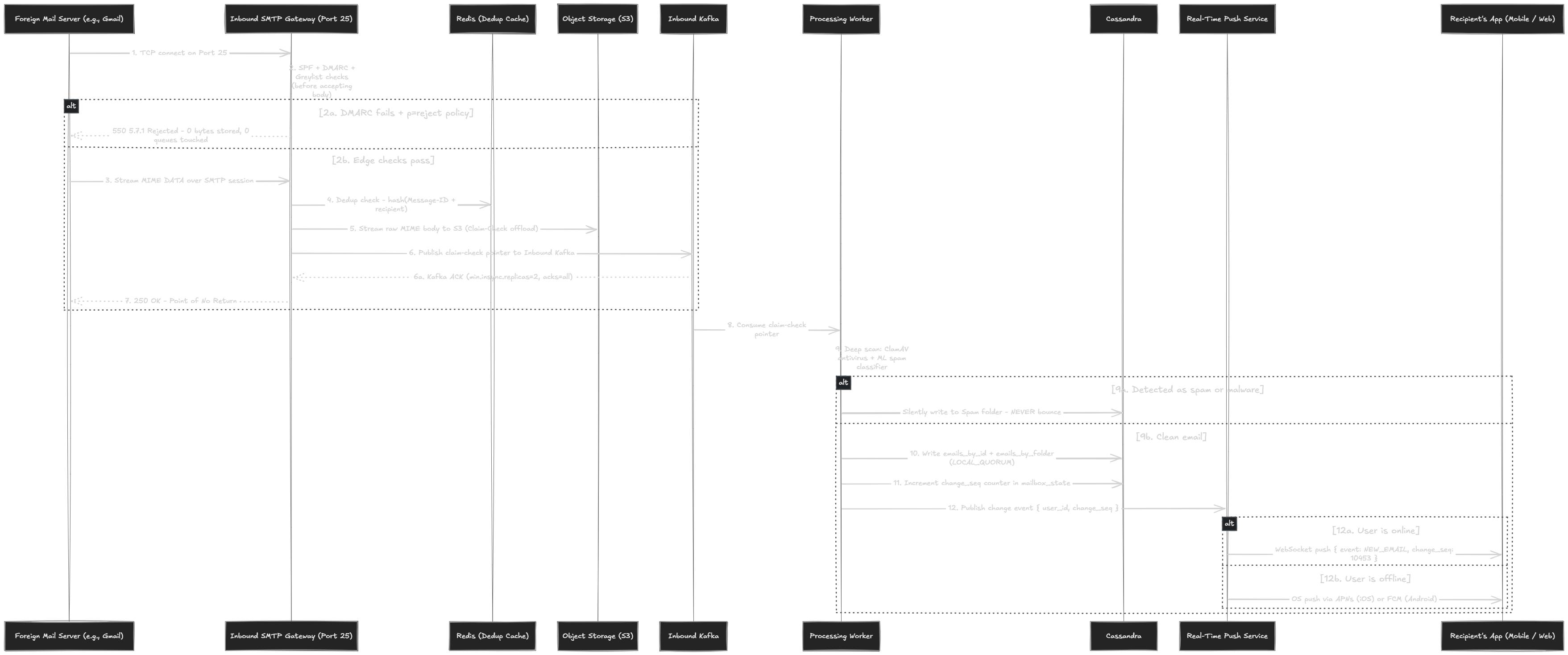
Phase 1: Wire Handshake & Two-Stage Edge Defense (Steps 1–4)
- 1. Anycast Port 25 Ingress:
Foreign servers establish TCP connections on standard port 25. BGP Anycast routes the sender to the closest regional edge gateway, minimizing TCP handshake latency. - 2. Pre-
DATAEnvelope Defense (Zero Disk Overhead):
Before issuing354 Start mail input, the gateway runs four lightweight checks:- DNSBL: Checks connecting IP against blocklists (Spamhaus ZEN).
- Greylisting: Returns
451 Greylistedfor unknown sender IPs (legitimate MTAs retry; spambots drop). - Envelope SPF: Verifies connecting IP is in the
MAIL FROM:domain’s DNS TXT SPF record. - Recipient Verification: Verifies
RCPT TO: <alice@ourdomain.com>exists in Redis/Cassandra. If unknown, returns550 5.1.1 User unknownimmediately to prevent directory harvesting.
- 3. Post-
DATAHeader Inspection (DKIM & DMARC):
As the message headers arrive:- Validates cryptographic signature in
DKIM-Signatureagainst sender’s DNS public key. - Verifies DMARC alignment: human-visible
From:header domain must align with SPF or DKIM domains. If policy isp=rejectand checks fail, rejects with550 5.7.1 DMARC policy violationbefore writing to storage.
- Validates cryptographic signature in
- 4. Atomic Retransmission Deduplication (Redis):
Computeshash(Message-ID + recipient)and runs atomicSET dedupe:{hash} 1 NX EX 86400. If key exists (sender retried due to network drop), the gateway returns250 OKto clear the sender’s spool without creating duplicate messages in Alice’s inbox.
Phase 2: Durability & The Point of No Return (Steps 5–7)
- 5. S3 Body Offload & Claim-Check Pointer:
The gateway streams the raw MIME payload tos3://email-bodies/{year}/{month}/{email_id}.mimeand generates a< 1 KBJSON claim-check pointer:{ "email_id": "8a3d1240-8b1a-11ef-93a0-0242ac120002", "user_id": "f47ac10b-58cc-4372-a567-0e02b2c3d479", "sender": "bob@example.com", "recipient": "alice@ourdomain.com", "s3_body_key": "bodies/2026/10/8a3d1240.mime", "size_bytes": 48200, "received_at": 1729158000 } - 6. Synchronous Kafka Multi-AZ Replication:
The gateway publishes the claim-check pointer to the Inbound Kafka topic partitioned byhash(user_id). It blocks synchronously for Kafka to confirm replication (acks=all,min.insync.replicas=2). - 7. The Point of No Return (
250 OK):
Only after Kafka acknowledges does the gateway return250 OK: Message accepted for delivery.The Custody Contract: In RFC 5321,
250 OKtransfers legal custody of the message. The remote sender permanently deletes its spool copy. If your system acknowledges before multi-AZ persistence and crashes, the email is lost forever. If Kafka is degraded, return451 Temporary Failure— the remote MTA will safely retain the email and retry.
Phase 3: Asynchronous Scan, Storage & Multi-Device Push (Steps 8–12)
- 8. Decoupled Worker Consumption:
Background workers consume claim-checks from Kafka. Partitioning byhash(user_id)guarantees all inbound messages for Alice are processed by a single worker thread in strict arrival order. - 9. Deep Inspection & The Backscatter Prevention Rule:
Worker fetches the body from S3 and runs ClamAV malware scanning and ML spam classification.The Backscatter Rule: If an email is classified as spam/malware after
250 OK, never send an automated bounce (NDR). Spammers routinely forge innocent addresses in theFrom:header. Bouncing an accepted email delivers spam to an innocent third party, resulting in instant domain and IP blacklisting. Silently route to Spam or quarantine. - 10. Mailbox Writes (
LOCAL_QUORUM):
Worker commits metadata across Cassandra tables:emails_by_folder,emails_by_id, andmessages_by_thread.LOCAL_QUORUMensures survival across AZ failure and provides immediate read-your-writes consistency. - 11. Monotonic Change Sequence (
change_seq):
Worker increments the user’s monotonicchange_seqinmailbox_stateand logs the event tomailbox_change_log. Single-thread per-user Kafka partitioning ensures zero race conditions or distributed locks. - 12. Dual-Path Real-Time Client Delivery:
- Online User (Browser / Active App): The Real-Time Server pushes a lightweight WebSocket frame:
The client fires{ "event": "NEW_EMAIL", "change_seq": 10453 }GET /v1/messages?folder=inbox&since=10452to render the message in sub-second latency with zero manual refresh. - Offline User (Device Locked / Background): Dispatches Apple APNs or Google FCM push notifications to display system alerts.
- Reconnection Delta Sync: When the app awakens, it requests
GET /v1/sync?since=<last_known_seq>. Cassandra returns only the exact changed rows frommailbox_change_log, catching up the device in a single lightweight payload.
- Online User (Browser / Active App): The Real-Time Server pushes a lightweight WebSocket frame:
8. Data Modeling (Cassandra Schema)
Relational databases fall apart at 400K+ writes/second. We use Apache Cassandra, an LSM-tree distributed database designed for write-heavy workloads.
To make Cassandra performant, every table must satisfy two rules:
- Sharded by user: The partition key must contain
user_id. Every query hits exactly one partition. Zero cross-node scatter/gather. - Bounded partition size: Partitions must stay under 100 MB. We use monthly time-bucketing (
bucket_month) to ensure high-volume inboxes never grow unbounded.
Why Cassandra Over Relational & Document Databases
At 400K+ write QPS, storage engine mechanics determine survival:
- Relational (PostgreSQL / MySQL): B-tree index rebalancing and Write-Ahead Log (WAL) flushes create severe disk I/O bottlenecks under continuous high-write throughput.
- Document (MongoDB): Document-level locks and distributed shard routers introduce latency overhead under continuous ingestion.
- Cassandra (Chosen): Its Log-Structured Merge (LSM) engine converts random writes into sequential disk appends. Its masterless, peer-to-peer topology scales horizontally with zero single-primary write bottleneck.
- GDPR & Data Residency: Partitioning by
user_idmaps cleanly to geographic datacenter rings (e.g., EU users pin strictly to EU Cassandra nodes and S3 buckets).
Schema Architecture
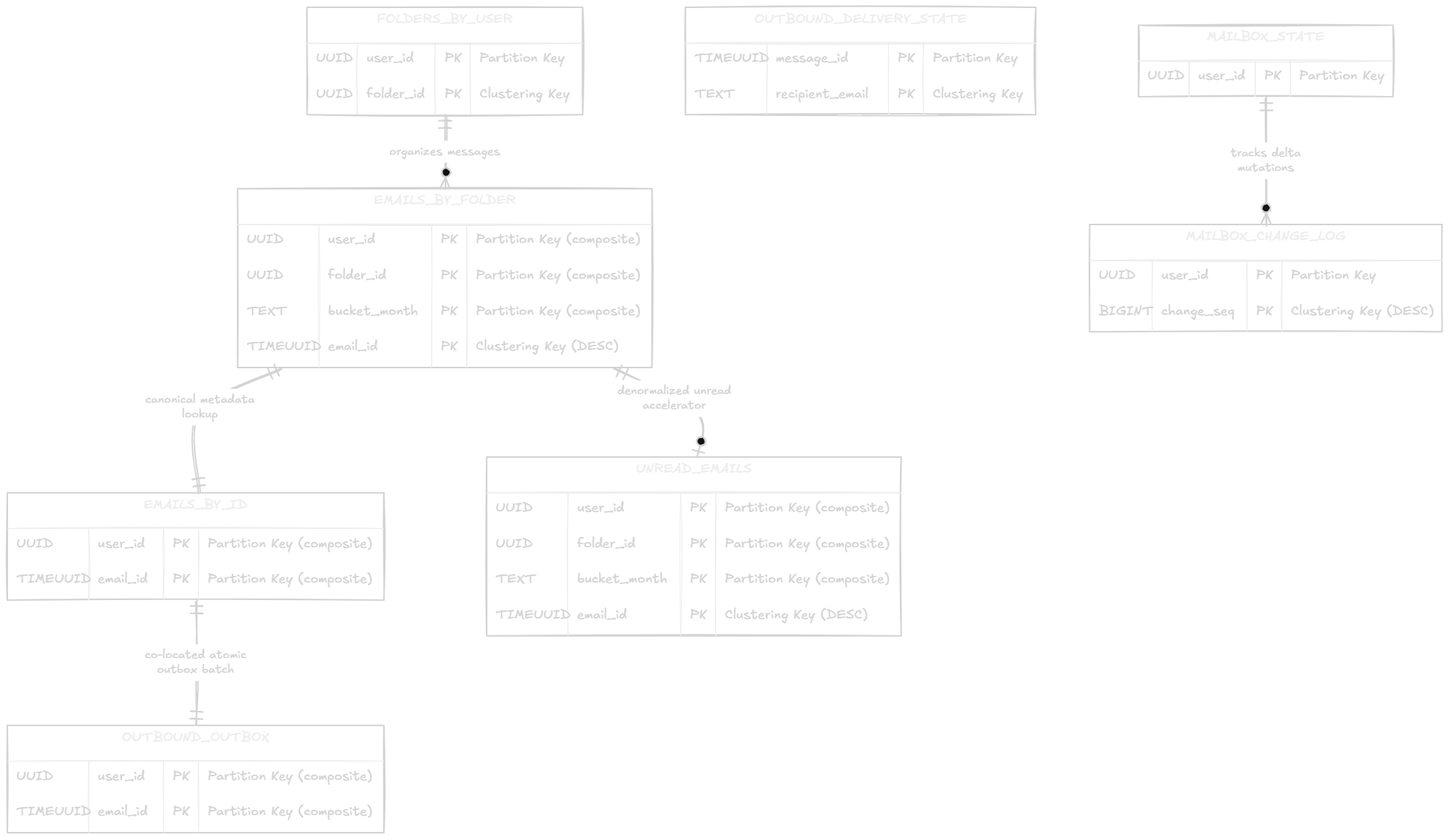
Storage Schema & Design Justifications
| Table | Partition Key (Node Placement) | Clustering Key (On-Disk Order) | Primary Query Supported |
|---|---|---|---|
emails_by_folder | ((user_id, folder_id, bucket_month)) | email_id DESC | Paginated folder views via sequential disk scan |
emails_by_id | ((user_id, email_id)) | None (point lookup) | Fetch full metadata & S3 body key when opening a message |
unread_emails | ((user_id, folder_id, bucket_month)) | email_id DESC | Fast O(1) unread count badges without full-partition scans |
messages_by_thread | ((user_id, thread_id)) | email_id ASC | Full conversation thread timeline view (Gmail-style threading) |
mailbox_change_log | ((user_id, bucket_month)) | change_seq ASC | Delta sync queries (WHERE user_id = ? AND change_seq > ?) |
mailbox_state | ((user_id)) | None | Monotonic last_change_seq and mailbox quota counters |
outbound_outbox | ((user_id, email_id)) | None | Atomic transactional outbox batch with cdc = true |
outbound_delivery_state | ((message_id)) | recipient_email ASC | Per-recipient outbound delivery tracking & crash dedup |
idempotency_keys | ((user_id, idempotency_key)) | None | Prevents double-sends; TTL 60-second lease |
Key Cassandra Design Decisions
| Architectural Decision | Target Scope | Technical Rationale & Failure Mode Avoided |
|---|---|---|
TIMEUUID DESC Clustering | emails_by_folder | Physically clusters rows in reverse-chronological order. Fetching the top 50 inbox items executes as a single sequential disk scan instead of an in-memory sort. |
bucket_month Partitioning | emails_by_folder, change_log | Bounds partition sizes < 25 MB for heavy senders (500 msgs/day = ~180K rows/yr), preventing Cassandra’s 100 MB partition boundary warning. Queries fetch month and backfill from month - 1 as needed. |
Dedicated unread_emails | unread_emails | Avoids expensive full-partition scans across read messages (WHERE is_read = false). Enables O(1) badge counts; rows are deleted when read. |
| RFC 5322 Thread Linking | messages_by_thread | Links messages via In-Reply-To and References headers. Clustering by email_id ASC fetches full multi-year conversation threads in a single continuous sequential read. |
| Per-Recipient Tracking | outbound_delivery_state | Prevents duplicate deliveries on multi-recipient mail. If an outbound worker crashes mid-batch before committing Kafka offsets, retry workers dedup against completed recipients. |
LOCAL_QUORUM Consensus | Cluster Replication | Avoids 80–120 ms cross-WAN latency and partition stalls during fiber cuts. Confirms local quorum (< 5 ms) for read-your-writes, resolving asynchronous cross-region sync via Last-Write-Wins (LWW). |
Compaction Strategy Specialization
In write-heavy Cassandra clusters, matching compaction to access patterns prevents latency degradation and disk bloat:
| Strategy | Target Tables | Workload Pattern | Engine Mechanics & Operational Benefit |
|---|---|---|---|
| Leveled (LCS) | unread_emails, emails_by_folder | Read-heavy with high DELETE tombstones (mark-as-read, archive, trash) | Maintains fixed-size SSTables across strict levels. Guarantees 90% of reads check a single SSTable and aggressively purges tombstones to eliminate read timeouts. |
| Time Window (TWCS) | mailbox_change_log, idempotency_keys | Append-only time-series with explicit TTL expiration | Partitions SSTables into time windows. Drops entirely expired SSTables via single file unlinks with zero compaction I/O. |
| Size Tiered (STCS) | emails_by_id | Immutable, write-once metadata point lookups | Merges SSTables of similar sizes, minimizing write amplification during 1.2M msg/sec peak ingestion. |
9. Deliverability, IP Reputation & Hygiene
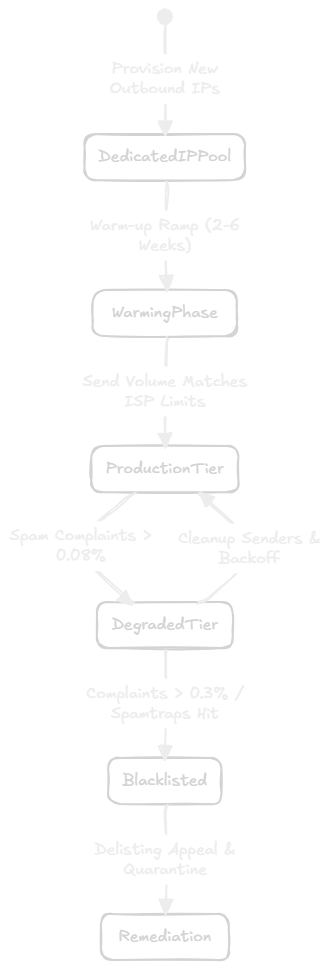
Outbound delivery relies on external ISP trust (Google, Yahoo, Microsoft). Without strict cryptographic identity, connection hygiene, and volume management, remote MTAs drop connections or route mail directly to spam.
The Authentication Triad
| Protocol | Spec | Validates | Mechanism & Policy |
|---|---|---|---|
| SPF | RFC 7208 | Envelope Sender (MAIL FROM) | DNS TXT enumerates authorized sending IPs (v=spf1 ip4:... ~all). |
| DKIM | RFC 6376 | Header & Body Integrity | Sender signs with private RSA/Ed25519 key; remote MTA verifies with DNS public key. |
| DMARC | RFC 7489 | Identifier Alignment | Enforces human-visible From: matches SPF/DKIM domains; defines policy (p=none, p=quarantine, p=reject). |
Deliverability Operations & ISP Hygiene
| Operational Dimension | Standard / Threshold | Engineering Requirement & Failure Impact |
|---|---|---|
| FCrDNS (Reverse DNS) | RFC 5321 | Outbound IP must have PTR resolving to EHLO hostname, which forward resolves back to the same IP. Mismatches cause immediate connection drops. |
| IP Pool Segregation | Infrastructure Isolation | Dedicate separate IP pools for Transactional (2FA/resets), Marketing, and User traffic. Prevents marketing bulk complaints from degrading auth delivery. |
| IP Warm-Up Ramp | 4–6 Weeks | Cold IPs have no reputation; scale daily volume gradually (e.g., 500 → 10,000 → 500,000/day) to prevent ISP rate limits and silent defers. |
| Spam Complaint Limits | < 0.1% Threshold | Keep complaint rate < 0.1% (1 per 1,000); exceeding 0.3% triggers automatic domain/IP blacklisting or junk-folder routing. |
| One-Click Unsubscribe | RFC 8058 | Bulk mail must include List-Unsubscribe: <https://...> and List-Unsubscribe-Post: List-Unsubscribe=One-Click to facilitate direct opt-outs over spam reports. |
| Feedback Loops (FBL) | RFC 5965 (ARF) | Ingest Abuse Reporting Format webhooks from mailbox providers to automatically suppress complaining addresses from future sends. |
Open-Source Reference Architecture
| System Layer | Component(s) | Implementation Role |
|---|---|---|
| SMTP Transport | Postfix / Exim | RFC 5321 edge handshake, connection pooling, and outbound spool |
| Mailbox Access | Dovecot | IMAP (RFC 3501) / POP3 (RFC 1939) / LMTP synchronization |
| Hygiene & Inspection | SpamAssassin + ClamAV | Bayesian/heuristic spam scoring and signature malware scanning |
| Webmail Interface | Roundcube | Modern multi-folder browser webmail client |
| Auth & Security | OAuth 2.0 + Argon2 / bcrypt | Token-based authentication, salted password hashing, and service RBAC |
10. Failure Modes & Operational Playbook
| Failure Scenario | Immediate System Impact | Automated Recovery / Architecture Defense |
|---|---|---|
| Availability Zone (AZ) Outage | 1/3 of Cassandra and Kafka nodes go offline | LOCAL_QUORUM succeeds with 2/3 replicas intact. Kafka in-sync replicas (min.insync.replicas=2) elect surviving AZ leaders. Multi-AZ S3 continues unaffected. Zero downtime. |
| Complete Regional Outage | Primary datacenter completely unreachable | DNS MX records fail over to secondary region (MX 10 primary, MX 20 secondary). Cassandra cross-region replication keeps secondary metadata fresh. Bodies replicate via S3 Cross-Region Replication (CRR). RTO < 15 min, RPO bounded by replication lag. |
| Kafka Broker Cluster Saturation | Inbound queue latency spikes; disk fills up | SMTP Inbound Servers fail to obtain durable acks=all. They stop accepting connections and return SMTP 451 Temporary Failure. External MTAs retain messages on their own spool and retry later. |
| Cassandra Compaction Debt | High write bursts cause read latency spikes | Leveled Compaction Strategy (LCS) ensures predictable read times. Heavy search indexing jobs are throttled via Kafka consumer rate limits to prioritize user-facing reads. |
| Outbound Worker Crash Mid-Delivery | Worker dies after external MTA returns 250 OK but before committing Kafka offset | Kafka partition rebalances to a surviving worker. The new worker checks outbound_delivery_state. Because the recipient is marked DELIVERED, it skips redelivery and commits the offset. |
| Real-Time Push Server Crash | Thousands of active WebSocket connections drop | Client apps automatically reconnect to any available Real-Time Server and issue a delta sync query: GET /v1/sync?since=<last_known_seq>. |
11. Key Takeaways
Core design takeawaysReview the five architectural paths before moving on to the quiz.Show summaryHide summary
Email Service at Scale
Review the five architectural paths before moving on to the quiz.
Inbound Receiving PathFrom edge SMTP handshakes to durable Cassandra mailbox ingest
SMTP Edge & Protocol Handshake
Security & Hygiene Inspection
Claim-Check Storage & Custody Handshake
Inbound Worker Ingestion
Outbound Sending PathFrom client submission to verified remote domain inbox delivery
Submission & Transactional Outbox
Outbound Worker Processing
ISP Delivery & Retry Engine
ISP Reputation & Deliverability
Storage & Data ModelingClaim-Check separation, Cassandra sharding, and compaction tuning
Claim-Check Separation
Cassandra Schema & Key Decisions
Compaction Strategy Specialization
Mailbox Operations & Multi-Device SyncDelta synchronization, monotonic sequences, and push notifications
Sequence-Based Delta Sync
Real-Time Push Notification Engine
Search Indexing Pipeline
Consensus, Deliverability & High AvailabilityReplication boundaries, failure modes, and recovery playbooks
Consensus & Replication Boundaries
Failure Scenarios & Operational Defense
Backscatter Spam Prevention
12. Quiz
Can you design an email system that survives scale?
Ten critical scenarios across ingestion, storage, deliverability, and consensus. Make your choice before revealing the answer.
In the context of email architecture, why is a spammer able to forge a 'From: security@yourbank.com' address even if the email originated from an unknown server?